- DATE:
- AUTHOR:
- The Balance team

Product Updates: June 2026
Three releases this month, built to give you more control and save you time: a faster way to create and charge for transactions, end-to-end dispute management, and Sentinel, a new engine that catches fraudulent transactions with rules you control.
Let's dive in
Build an invoice and charge for it in one guided flow
Create a transaction with a full invoice and charge for it on the spot, with every decision and detail in one view. As you build the invoice, the flow surfaces the buyer information you need right at the point you make each choice, with tooltips guiding you throughout.
In one place, you can:
Set the due date from a dropdown (including Pay today) and add line items, with options for shipping or a discount.
Set payment details, including financed or non-financed transactions, with auto-charge or manual collection options. Financed transactions are checked against the buyer's available credit limit in real time.
See exactly what the buyer will receive as you go, with a live invoice preview alongside the flow.
Add email recipients, review, and send, with tooltips guiding each step.
This new flow is now live in the Merchant Dashboard.

Screen every transaction with fraud rules you control
Catch fraud before it costs you. Sentinel, Balance's new fraud engine, checks every transaction against your rules automatically. The ones you've ruled out are blocked before they're authorized, so they never go through. Anything that needs a closer look is sent to a review queue, where you approve or decline with the buyer's full history in front of you.

Here's what you can do with Sentinel:
Write rules from transaction signals (amount, card country, AVS and ZIP checks, card funding type, email, and more) to allow, block, or route a transaction to review.
Dry-run any rule in shadow mode to see how it would have acted on real transactions before you set it live.
Work a review queue that shows each transaction's risk score, matched rules and reasons, and verification checks (CVC, ZIP, and address) at a glance. Approve to close the review, or decline to refund the payment.
See each transaction against the buyer's own history, with payment method history, shipping address history, and related transactions surfaced right inside the review. An out-of-pattern order or a brand-new shipping address stands out immediately.
Sentinel is rolling out gradually. Contact your account manager to request early access.

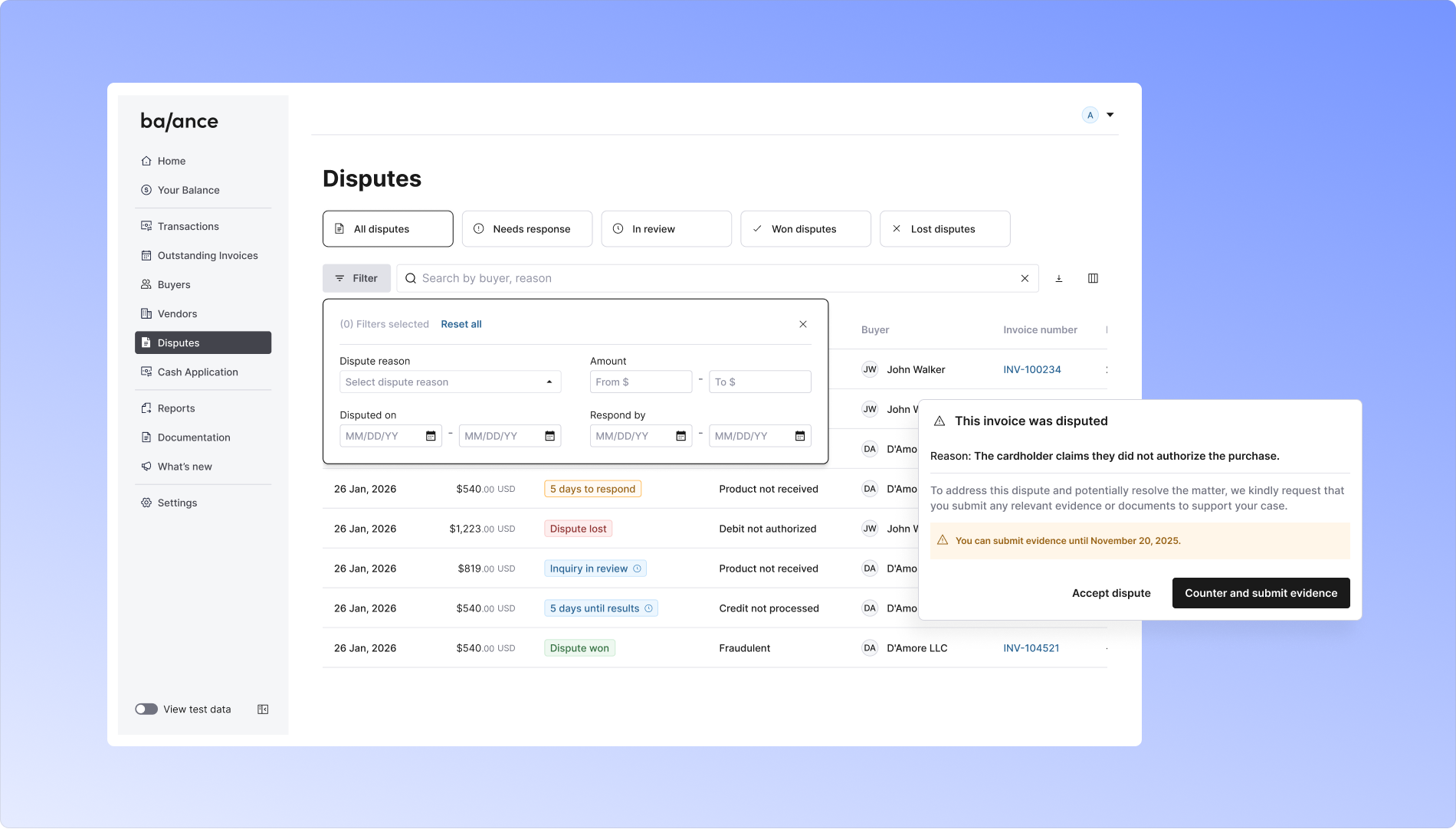
Handle every dispute end-to-end with Dispute Management
Every credit card and ACH debit dispute now runs through one place, from first notice to final outcome. Respond the moment a dispute lands, on your terms. We flag a new dispute both in your dashboard and by email, and you accept or counter it directly in the Merchant Dashboard. Accept, and the disputed amount is refunded through Stripe to the buyer's payment method. Counter, and you get a flow tailored to the dispute type.
The release covers:
The full range of dispute types, from product-not-received variants to fraudulent "did not authorize" claims, each with guidance on which evidence to submit, a place to upload it, and a category to select.
A new, comprehensive disputes dashboard listing every dispute and its status. Search by buyer or reason, filter by reason, date, and amount, and open any invoice for the full dispute detail.
Inquiry notifications you can act on early. When a cardholder's bank opens an inquiry ahead of a formal dispute, respond with evidence right in the flow, or issue a refund, to resolve it before it escalates.
Email notifications across the lifecycle: a new dispute, a reminder to submit evidence or accept, and the final won or lost outcome.
For ACH debit disputes, the flow points you to resolve them by contacting the buyer directly.
Dispute Management is now live in the Merchant Dashboard.